Why Choose Patch Cables for Reliable Network Connections?

Why Choose Patch Cables for Reliable Network Connections?

Reliable networks often depend on details hidden behind racks and cabinets. A patch cable is one of those details. It connects switches, patch panels, servers, computers, and testing equipment. Its short length keeps installations organized and reduces unnecessary signal paths.

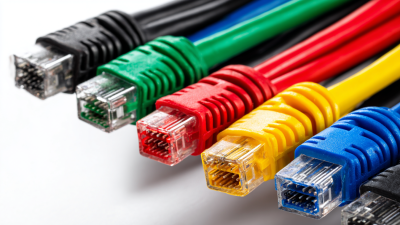
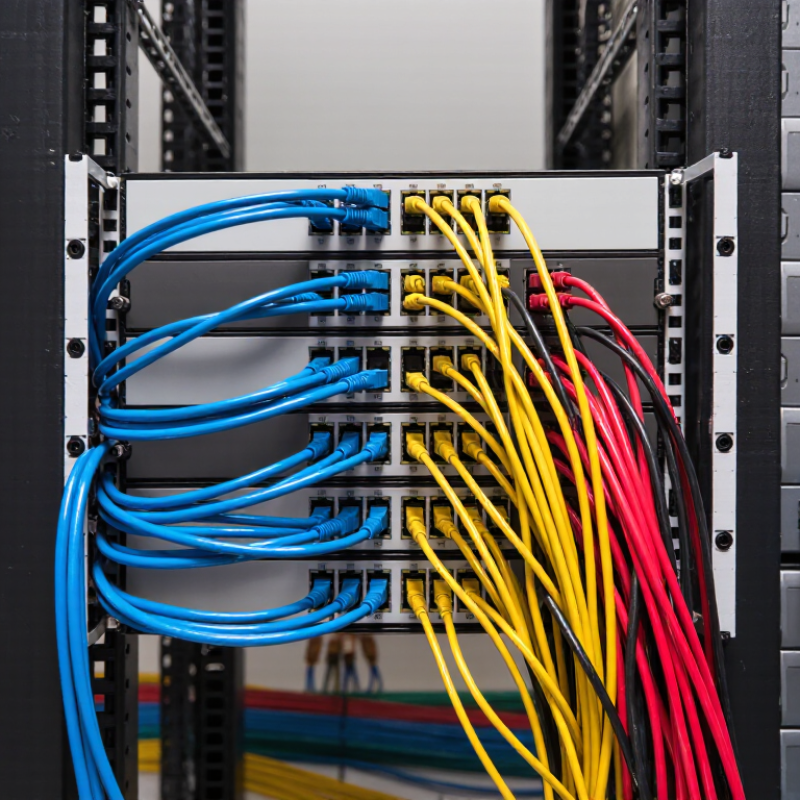
Valerie Maguire, a respected cabling standards expert, has said, “The cabling infrastructure is the foundation of the network.” This principle applies directly to patch cable selection. A properly manufactured cable supports stable performance, clean routing, and easier maintenance. In a busy server room, color-coded cables can identify departments quickly. Secure connectors can prevent accidental disconnections during routine service. Suitable shielding can also reduce interference near power equipment.

Experience shows that reliable connections require more than attractive packaging. Technicians should check cable category, conductor material, connector quality, bend radius, and testing records. A certified Cat6A patch cable may suit high-speed applications better than an unverified alternative. Length matters too. Excess cable creates loops, airflow problems, and avoidable confusion.

Small details matter.

Still, patch cables are not magical solutions. Poor installation can weaken even a premium product. A cable may pass a basic link test yet perform poorly under demanding conditions. That possibility deserves attention. Buyers should compare verified specifications, supplier reputation, and warranty support before choosing. They should also review their actual network environment instead of copying another installation blindly. Reliable connectivity comes from matching the patch cable to the equipment, distance, interference level, and maintenance needs. The best choice is practical, tested, and honestly evaluated.
Why Choose Patch Cables for Reliable Network Connections?

What Patch Cables Are and How They Support Network Connections

Patch cables are short, flexible cables that connect switches, patch panels, servers, routers, and wall outlets. Most use twisted-pair copper conductors with modular connectors. Their stranded construction bends more easily than solid horizontal cable. This suits crowded racks and frequent equipment changes.

The need is expanding. The International Telecommunication Union’s Facts and Figures 2023 report estimated 5.4 billion people used the internet, representing 67% of the global population. More connected devices create more local links to manage. A correctly rated patch cable supports stable Ethernet transmission across those links.

Category ratings, shielding, and connector quality affect performance. Cable length also matters. Excessive slack can block airflow and complicate troubleshooting.

Reliability still depends on installation discipline. The Uptime Institute’s 2024 Global Data Center Survey reported that 53% of respondents experienced an outage during the previous three years. A loose connector may seem minor, yet it can interrupt a critical path. Technicians should label both ends, respect bend limits, and test each link against applicable ISO/IEC 11801 requirements.

Short cables usually improve rack organization. They do not automatically guarantee better performance.

In real cabinets, color coding helps, but it is not foolproof. Labels can fade. Port maps can become outdated.

That uncomfortable detail deserves attention. A patch cable is simple hardware, but reliable connections require inspection, testing, and occasional reconsideration of the entire layout.

Key Features That Make Patch Cables Reliable

Why Choose Patch Cables for Reliable Network Connections?

Key Features That Make Patch Cables Reliable

Patch cables connect switches, patch panels, computers, cameras, and other network equipment. Their short length helps reduce cable clutter and limits unnecessary signal exposure. In practical installations, a well-made cable feels flexible, but not loose or fragile. That balance matters when cables bend behind a rack.

Reliable patch cables use accurately twisted conductors and carefully fitted connectors. These features help maintain signal quality and reduce transmission errors. Gold-plated contacts can resist oxidation, while molded strain relief protects the connector during repeated movement. Small details often prevent expensive troubleshooting later. Cable labels also make testing and maintenance faster.

Shielding can improve performance in areas with motors, power supplies, or dense wiring. However, shielding alone cannot fix poor grounding or careless installation. I have seen neat-looking cable runs fail because connectors were not fully seated. Testing each link remains essential. A cable tester can reveal opens, shorts, reversed pairs, and weak terminations before users notice a problem. Category ratings should also match the network equipment and expected data speed. Higher ratings are not automatically better when the installation ignores bend limits or length requirements.

Why Choose Patch Cables for Reliable Network Connections?

Key Features That Make Patch Cables Reliable

Higher-category patch cables support higher rated frequencies, helping maintain signal quality for faster Ethernet applications. Cat 5e is rated up to 100 MHz, Cat 6 up to 250 MHz, Cat 6A up to 500 MHz, and Cat 8 up to 2,000 MHz. Proper connector quality, cable construction, and length selection are also essential for reliable network connections.

Reference basis: commonly published ISO/IEC and TIA category performance specifications.

Common Patch Cable Types and Their Network Uses

Common Patch Cable Types and Their Network Uses

Patch cables connect switches, patch panels, servers, computers, and wall outlets. Their short lengths reduce slack behind crowded racks. Copper Ethernet cables remain common for offices and access networks.

Cat5e usually supports Gigabit Ethernet over distances up to 100 meters. Cat6 handles higher frequencies and can support 10Gbps over shorter runs. Cat6A supports 10Gbps across the full 100-meter channel when installation conditions are suitable.

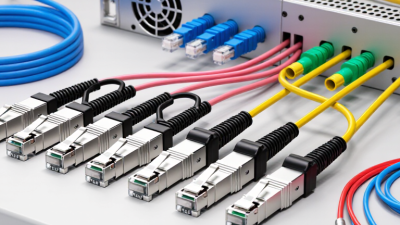
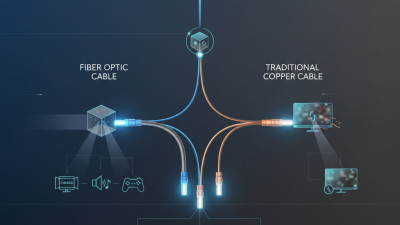
Fiber patch cables serve longer links and areas exposed to electromagnetic interference. Multimode fiber suits many building and data-center connections. Single-mode fiber supports longer distances between facilities.

The choice should match the port, distance, bandwidth, and environment.

A 2023 Ethernet Alliance report highlighted 800Gbps Ethernet development for data-center networks, showing how quickly backbone requirements are rising. Patch cords cannot create that speed alone. The transceivers, permanent cabling, and equipment must also support it.

Cisco’s Annual Internet Report forecast 29.3 billion networked devices by 2023, increasing pressure on organized, serviceable cabling.

In real installations, poor labeling still causes avoidable troubleshooting. That detail is easy to underestimate.

Tips: Keep copper patch cables short and bend them gently. Use matching category ratings at both ends. Check fiber polarity before connecting. Label each cable by destination, not only by rack position. Test links after changes.

I have seen neat-looking racks hide incorrect connections, so visual inspection is not enough. Patch cables are small components, but careless selection can weaken an otherwise capable network.

How to Select the Right Patch Cable for Each Setup

Choosing the right patch cable starts with the setup, not the color.

A small office may need Cat6 for ordinary gigabit connections, while a server room may justify Cat6A for 10Gbps links. ANSI/TIA-568.2-D supports copper channels up to 100 meters, including permanent cabling and patch cords. Beyond that distance, fiber is usually more dependable. The 2023 Annual Internet Report projected 29.3 billion connected devices worldwide, so cable selection now affects dense, constantly active networks.

Check the connector type, cable length, shielding, and bend radius before ordering. Use shorter cords when possible. Extra cable creates loops, airflow problems, and avoidable signal stress. Shielded cables can help near motors, power equipment, or heavy electrical noise, but they need proper grounding. For Power over Ethernet, inspect bundle size and heat conditions. TIA-TSB-184-A warns that larger bundles can raise cable temperature and increase insertion loss. I still recheck port speeds and outlet layouts twice; a tidy rack can hide a poor cable choice.

Tips:

  • Match the cable category to the slowest port.
  • Keep copper runs within 100 meters.
  • Avoid sharp bends and tight cable ties.
  • Label both ends before installation.
  • Test every link after termination.

A basic certification test can reveal return loss, crosstalk, and wiring faults that visual checks miss. This step feels slow, but skipping it often creates harder problems later.

Best Practices for Installing and Maintaining Patch Cables

Patch cables provide short, flexible links between switches, patch panels, servers, and wall outlets. Their compact design helps keep network cabinets organized and makes equipment changes easier. Reliable connections begin with the correct cable type and length. Choose a suitable category rating for the required speed and installation environment. Avoid using an unnecessarily long cable, because extra slack can obstruct airflow and complicate troubleshooting.

Install each cable without sharp bends, twists, or heavy pressure from cabinet doors. Respect the recommended bend radius, usually based on the cable’s diameter. Keep data cables separated from power cables when practical. This can reduce electromagnetic interference. I have seen loose connectors cause intermittent faults that looked like software problems. Always seat both plugs firmly, then test the link with an approved cable tester. Label both ends clearly. Small details matter.

Tips: Use different cable lengths to reduce loops. Route cables through horizontal managers, not across ventilation openings. Inspect connectors for broken clips, dust, or exposed wires during routine maintenance. Replace damaged cables instead of repeatedly reseating them. Record test results and port locations for future checks. A visual inspection is useful, but it is not enough. Even experienced technicians can miss a poor termination without testing. Review the layout after installation, because the first arrangement is rarely perfect.

Why Choose Patch Cables for Reliable Network Connections? - Best Practices for Installing and Maintaining Patch Cables
Data Dimension Recommended Practice or Specification Why It Matters for Reliability Installation or Maintenance Check
Cable Category Cat 5e Supports Gigabit Ethernet over a compliant channel.
Cat 6 Supports Gigabit Ethernet and can support 10 Gigabit Ethernet over shorter distances, depending on the installation environment.
Cat 6A Designed for 10 Gigabit Ethernet channel performance up to 100 meters when the complete link is properly installed.
Choosing a category that matches the required speed and transmission distance helps prevent performance limitations and unnecessary replacements. Confirm that patch-cable category, permanent cabling, connectors, and connecting hardware are compatible with the target network standard.
Total Channel Length Keep the complete copper channel within the commonly specified 100-meter maximum: up to 90 meters of permanent link plus up to 10 meters of patch and equipment cords. Exceeding the channel-length limit can increase attenuation, delay, and error rates. Measure or document permanent-link length and include both ends' patch cords in the total channel calculation.
Patch-Cable Length Use the shortest practical cable that provides service and routing flexibility. Avoid excessive slack, tightly bundled loops, or cables stretched under tension. Proper length reduces clutter, airflow obstruction, accidental unplugging, and strain on ports and connectors. Use cable-management rings, horizontal managers, or hook-and-loop straps to maintain an orderly service loop without compressing the cables.
Conductor Type Use stranded patch cables for flexible equipment connections. Use solid-conductor cable primarily for fixed horizontal cabling where the cabling system specifies it. Stranded conductors tolerate repeated movement better, while solid conductors are generally intended for fixed runs and stable terminations. Do not substitute a cable type that conflicts with the connector, patch-panel, or cabling-system requirements.
Connector Termination Use correctly rated modular plugs and jacks. Ensure the plug latch is fully engaged and the cable boot does not prevent complete insertion. Incomplete or incompatible terminations can cause intermittent links, packet errors, and unexpected negotiation problems. Check link lights, inspect the latch and contacts, and test the channel with an appropriate cable verifier or certifier.
Bend Radius Do not exceed the cable manufacturer's minimum bend-radius requirement. As a general practice for balanced copper cable, avoid sharp bends and kinks; many designs specify a minimum bend radius of approximately four times the cable diameter. Over-bending can change pair geometry, increase crosstalk, and damage the cable structure. Route cables in smooth curves and avoid forcing them around rack edges, hinges, or tightly packed cable-management hardware.
Pulling and Handling Patch cables should not be pulled by the connector, used to support equipment, or placed under continuous tension. Mechanical stress can damage the plug, latch, conductors, and internal pair geometry. Move equipment by its enclosure, release latches before removal, and replace cables showing crushed jackets, exposed conductors, or broken clips.
Electromagnetic Interference Keep copper patch cables away from strong electrical noise sources where practical, including power cables, motors, transformers, and fluorescent-light ballasts. Reducing electromagnetic coupling helps preserve signal quality and lowers the risk of retransmissions or unstable links. Use structured routing and maintain separation according to applicable cabling standards and local electrical requirements.
Shielding Selection Use unshielded or shielded patch cables according to the installed cabling system and grounding design. Do not mix shielding components without confirming compatibility. An improperly implemented shield can provide little protection and may create grounding or bonding issues. Verify that shielded connectors, jacks, patch panels, and bonding practices are consistent throughout the link.
Power over Ethernet For PoE applications, use patch cables and connecting hardware rated for the required PoE current and temperature conditions. Keep bundles within the applicable installation guidance. PoE increases conductor heating, especially in dense bundles, which can affect insertion loss and cable performance. Check the cable's temperature rating, bundle size guidance, and compatibility with the intended PoE power level before deployment.
Labeling and Documentation Label both ends of each patch cable or document each port-to-port connection using a consistent naming scheme. Clear identification reduces troubleshooting time and helps prevent accidental disconnections. Update rack diagrams, switch-port records, and asset documentation whenever a cable is installed, moved, or removed.
Inspection Frequency Inspect cables during planned maintenance and whenever a link shows intermittent connectivity, speed negotiation changes, or elevated error counts. Many patch-cable failures result from physical damage, loose latches, contamination, or excessive bending rather than normal aging. Look for flattened sections, damaged boots, bent contacts, loose plugs, contamination, and unsupported cable weight.
Testing and Troubleshooting Use a cable verifier for wire-map and continuity checks; use a qualified certifier when formal channel or permanent-link compliance is required. Visual inspection alone cannot identify every wiring error, excessive loss, crosstalk problem, or marginal connection. Test after installation, retain test results where required, and replace a suspect patch cable with a known-good cable to isolate faults.
Cleaning and Replacement Keep connectors protected from dust and moisture. Replace cables that fail testing or show visible mechanical damage rather than repeatedly bending or repairing them. Clean, undamaged interfaces provide more consistent contact and reduce intermittent failures. Use approved cleaning procedures and avoid abrasive materials or unauthorized modifications to connectors.
x