
How to Choose the Best 4x2 HDMI Matrix Switch?

Choosing the right 4x2 Hdmi Matrix Switch is less about finding the longest feature list. It is about matching real equipment, signal demands, and daily operating habits. A switch may advertise 4K support, yet fail when sources use different refresh rates, HDR formats, or HDCP versions. Jeff Boccaccio, a respected HDMI compliance specialist, has emphasized, “Every HDMI system is only as strong as its weakest link.” That principle deserves attention before any purchase.

A reliable selection process begins with the source devices and displays. Count the inputs carefully. Then check whether the switch supports the required resolution, frame rate, HDR standard, and audio format. Confirm its bandwidth, especially for 4K at 60Hz or higher refresh rates. EDID management matters when a laptop, game console, and media player share the same system. HDCP compatibility matters too. Small details can create a black screen.

Installation distance also changes the decision. A short cable run may work perfectly on a test bench. A longer run through a wall can expose signal weakness. Look for dependable switching, clear status indicators, remote control options, and stable power delivery. Test every input with every output when possible. That takes time. It also prevents expensive surprises. A neat specification sheet can still mislead. In some cases, a simpler 4x2 Hdmi Matrix Switch is more dependable than a feature-heavy model with poor documentation. The best choice is not always the cheapest, newest, or most powerful. It is the one that performs consistently in your actual system.
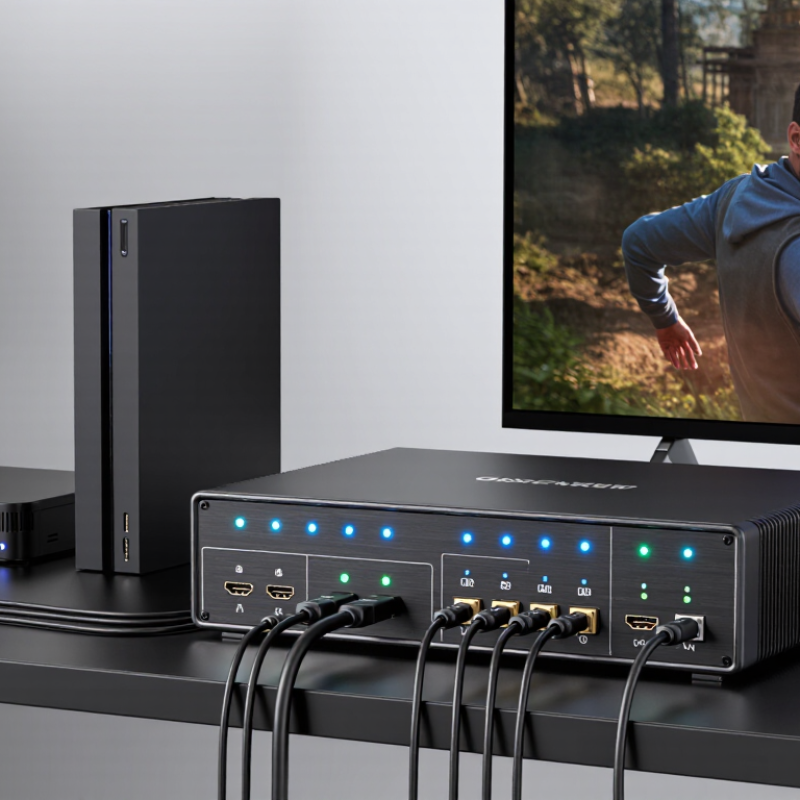
How to Choose the Best 4x2 HDMI Matrix Switch?

What Is a 4x2 HDMI Matrix Switch?

A 4x2 HDMI matrix switch connects four HDMI sources to two displays. Each output can select a different source independently. For example, a game console can appear on a monitor while a streaming device plays on a television. A normal splitter usually sends one source to several screens. A matrix switch provides routing flexibility instead.

The need is practical. The Consumer Technology Association’s 2024 U.S. Consumer Technology Ownership Study reported 4K Ultra HD televisions in about 69% of American households. More 4K screens mean more attention to resolution, refresh rate, and signal stability. A suitable switch should support the required HDMI specification, HDCP version, HDR formats, and audio return features. HDMI 2.1 equipment can support bandwidth up to 48 Gbps, including 4K at 120 Hz under suitable conditions.

Check the details.

In real installations, EDID management matters. It helps sources recognize the display’s capabilities and reduces blank screens or incorrect resolutions. Test each cable path separately, especially beyond five meters. Passive cables can become unreliable at higher bandwidths. I have seen systems work with one display but fail when both outputs were connected. That result is easy to misread as a defective switch. Sometimes, the display’s EDID causes the problem. The report figures are useful, but household usage varies widely. A matrix switch should match the complete signal chain, not just the television’s advertised resolution.

How to Choose the Best 4x2 HDMI Matrix Switch?

What Is a 4x2 HDMI Matrix Switch?

A 4x2 HDMI matrix switch accepts up to four HDMI sources and routes them independently to two HDMI displays. When choosing a model, compare its supported HDMI bandwidth, resolution, refresh rate, HDCP compatibility, audio formats, EDID management, and switching reliability.

The chart compares the maximum theoretical link bandwidth of common HDMI interface generations. HDMI 1.4 provides up to 10.2 Gbps, HDMI 2.0 up to 18 Gbps, and HDMI 2.1 up to 48 Gbps. For a 4x2 matrix switch, select bandwidth that matches the highest resolution and refresh rate you plan to use, while also checking the device’s actual support for HDR, HDCP, audio return, and the required cable length.

How Does a 4x2 HDMI Matrix Switch Work?

How Does a 4x2 HDMI Matrix Switch Work?

A 4x2 HDMI matrix switch routes four source devices to two displays. Each input has an independent signal path. You can send a game console to both screens, or split a media player and console separately. The internal processor reads EDID data from each display. EDID tells the source which resolution, refresh rate, and audio format the display accepts. HDCP authentication then checks protected content compatibility. It happens quickly, but failures are possible.

The HDMI Forum specification lists bandwidth up to 48 Gbps for HDMI 2.1 FRL links. That capacity supports demanding formats, including 8K at suitable refresh rates. However, every device in the chain must support the same signal level. A television may accept 4K, while an older projector accepts only 1080p. The matrix may then reduce the shared output to 1080p. I have found this less obvious than expected. The screen can stay black without showing a clear fault.

CTA’s 2024 U.S. Consumer Technology forecast places consumer technology revenue near 512 billion dollars. More connected screens increase the value of flexible signal routing. When choosing a matrix, check bandwidth, HDCP version, audio extraction, and EDID controls. Test both outputs together. A specification sheet may describe ideal performance, not your actual cable length or display combination.

How to Choose the Best 4x2 HDMI Matrix Switch? - How Does a 4x2 HDMI Matrix Switch Work?
Selection Dimension Recommended Specification or Data Why It Matters
Basic Configuration 4 HDMI inputs and 2 HDMI outputs A 4x2 matrix accepts up to four source devices and sends any selected source to either of two displays. Each output can usually select a different input at the same time.
Typical Source Devices Media player, game console, computer, set-top box, or Blu-ray player Four inputs allow several HDMI sources to remain connected, reducing the need to repeatedly unplug and reconnect cables.
Output Routing Independent output switching For example, Output 1 can display Input 1 while Output 2 displays Input 3. Confirm that the model supports independent routing rather than only mirroring one source.
Video Resolution Choose according to the display system: 1920 × 1080 for Full HD, 3840 × 2160 for 4K UHD The matrix, HDMI cables, source devices, and displays must all support the intended resolution. A 4K display does not automatically make every connected source output 4K.
Refresh Rate 60 Hz for general 4K video; higher refresh rates require explicit product support Resolution and refresh rate work together. A switch may support 4K at 30 Hz but not 4K at 60 Hz, so both values should be checked in the specification sheet.
HDMI Bandwidth At least 10.2 Gbps for many 4K 30 Hz systems; approximately 18 Gbps for common 4K 60 Hz 4:4:4 systems Insufficient bandwidth can limit resolution, refresh rate, color format, or HDR performance. Select a bandwidth rating that matches the highest signal in the system.
HDR Support Look for stated support for HDR10, HLG, or other required HDR formats HDR compatibility depends on the complete signal path. The source, matrix, cable, and display must support the same HDR format.
Color and Chroma 4:4:4 for text and computer graphics; 4:2:0 or 4:2:2 may be used by some video sources Chroma subsampling affects color detail. Computer users should verify support for the desired RGB or 4:4:4 signal at the selected resolution and refresh rate.
HDCP Compatibility HDCP 2.2 for many protected 4K sources; backward compatibility with earlier HDCP versions is useful HDCP authentication protects digital content. A mismatch between source, matrix, and display can cause a blank screen or an error message.
EDID Management Automatic EDID, fixed EDID profiles, or manual EDID learning EDID tells a source which video and audio formats a display supports. Good EDID control helps prevent incorrect resolution selection when two displays have different capabilities.
Mixed-Display Systems Verify how the unit handles displays with different resolutions or HDR capabilities Some matrix switches use a common compatible format for both outputs, while others offer more flexible output-specific EDID control. This is important when combining Full HD and 4K displays.
Audio Extraction Optional support for stereo analog, optical, or HDMI audio output Audio extraction can send sound to powered speakers, an amplifier, or headphones while video continues to a display. Check supported audio formats and maximum channel configuration.
Audio Formats PCM 2.0 for broad compatibility; multichannel bitstream support only when explicitly listed Advanced formats may require compatible source, matrix, display, receiver, and EDID settings. Stereo PCM is generally the safest choice for mixed equipment.
Control Methods Front-panel buttons, infrared remote, and optional RS-232 or network control Buttons and remote controls suit home use. RS-232 or network control is more practical for installed systems, automation, and centralized equipment racks.
Switching Behavior Fast switching, signal detection, and stable re-authentication Changing inputs may trigger HDMI handshaking and HDCP authentication. Features such as signal memory and fast switching can reduce black screens and repeated reconnection delays.
HDMI Cable Planning Use certified cables appropriate for the required resolution, bandwidth, and distance Longer cables and poor-quality connections can cause intermittent video, sparkles, audio dropouts, or loss of signal. Keep cable runs as short as practical and avoid unnecessary adapters.
Installation Environment Check ventilation, power supply, mounting options, and operating temperature A matrix switch should have adequate airflow and a stable power source. Rack ears or mounting hardware may be useful for permanent installations.
Best Choice for Full HD 1080p at 60 Hz, HDCP compatibility, basic EDID, and remote control This configuration is suitable for classrooms, meeting rooms, and home systems that do not require 4K or advanced HDR features.
Best Choice for 4K Home Entertainment 4K at 60 Hz, approximately 18 Gbps bandwidth, HDR support, HDCP 2.2, and EDID management These features provide a stronger match for modern 4K sources and displays, especially when protected content and HDR are required.
Best Choice for Computer and Gaming Use Required resolution and refresh rate, low-latency switching, suitable chroma support, and gaming-feature compatibility Gaming and computer signals can demand higher refresh rates and full chroma detail. Confirm the exact combination of resolution, refresh rate, HDR, and variable-refresh features before purchase.
How the Signal Flows Source device → HDMI input → matrix routing circuit → selected HDMI output → display The matrix receives each source signal, reads display capability data through EDID, manages HDCP authentication, and routes the selected signal to one or both outputs.
Practical Buying Rule Choose based on the highest required resolution, refresh rate, bandwidth, HDR format, HDCP version, and audio format The most suitable model is not necessarily the one with the largest number of features. Compatibility with every device in the signal chain is the key requirement.
Important: Actual performance depends on the specific matrix switch, HDMI cables, source devices, displays, content-protection requirements, and the selected video and audio formats.

Which Video and Audio Specifications Should You Check?

When choosing a 4x2 HDMI matrix switch, start with bandwidth, not port count. The HDMI 2.0 specification defines up to 18 Gbps, supporting 4K at 60Hz with 4:4:4 chroma under suitable conditions. HDMI 2.1 raises the ceiling to 48 Gbps, allowing 4K at 120Hz and advanced gaming signals. CTA-861-G also identifies HDR metadata and timing requirements that affect compatibility. Check whether every input and output supports the same standard. A switch may advertise 4K, yet reduce color depth when several sources operate together.

Audio specifications deserve equal attention. Look for pass-through support for uncompressed 7.1-channel PCM, high-bitrate multichannel audio, and object-based formats. If one display uses an audio receiver, confirm ARC or eARC support. The HDMI specification lists eARC bandwidth up to 37 Mbps, which is far more capable than standard ARC. HDCP 2.2 or newer is important for protected 4K content. I always test each source with a long cable, because laboratory claims can feel optimistic. Small details matter. Check EDID management, downscaling, lip-sync control, and whether audio continues when a display is off. CTA’s 2024 consumer technology research shows 4K televisions remain a mainstream household category, so compatibility should be judged across mixed, older equipment. I would not assume “8K ready” guarantees stable 4K performance. That shortcut needs reconsideration.

How Can You Verify Compatibility With Your Devices?

Choosing the best 4x2 HDMI matrix switch begins with compatibility, not port count. Check every source device, display, and cable in your setup. A laptop may output 4K at 60Hz, while an older projector accepts only 1080p. The switch must support the lowest practical limit, or the picture may disappear. It happens.

Verify the HDMI version, supported resolutions, refresh rates, color formats, and HDCP requirements. Do not trust a single “4K” label. It may refer to 30Hz instead of 60Hz. Check whether your displays handle HDR, Dolby audio, or multichannel sound. EDID management is also important because two screens may request different settings. During installation, connect one source and one display first. Test the image, sound, switching, and standby recovery before adding the remaining devices.

Tips: Write down each device’s exact output settings. Use short, certified cables when possible, and avoid testing through several adapters. Test the longest cable run under full resolution. If the image flickers, reduce the refresh rate temporarily and inspect the power supply. A powered matrix usually performs more reliably than one depending only on HDMI power. I have found that product specifications can be accurate yet incomplete. Real compatibility depends on the entire signal chain, not the switch alone. Leave time for troubleshooting. Even a careful setup can reveal an unexpected handshake problem.

How Should You Compare Control, Installation, and Reliability?

Choosing the Best 4x2 HDMI Matrix Switch

A 4x2 HDMI matrix switch should match your daily control habits, not just its port count. In a small meeting room, front-panel buttons may be enough. In a classroom, remote control, IR, or RS-232 can prevent repeated trips to the equipment cabinet. Check whether switching feels immediate and whether the display names are clear. I once tested a unit with confusing indicators, and a simple source change became a guessing game.

Installation deserves a practical comparison. Measure the cabinet depth before ordering. Leave space for ventilation, especially when the switch operates for eight hours each day. Confirm that the input and output connectors fit your cable layout without sharp bends. EDID management can help displays recognize suitable resolutions, while HDCP compatibility reduces blank screens. Still, automatic settings are not always perfect. Test every source and display together, rather than trusting the specification sheet.

Reliability appears during ordinary use. Look for stable power delivery, firm connectors, responsive switching, and useful fault indicators. A good installation should recover cleanly after a display is turned off and restarted. Run a continuous test with different resolutions and cable lengths. Record failed handshakes, delayed audio, or occasional flicker. These small notes reveal more than a short demonstration. Choose equipment with clear technical documentation, accessible support, and a realistic warranty. Fancy control options matter less if the switch overheats or loses settings overnight.

x